
Service Reset for Mercedes-Benz
Reset the service indicator after maintenance so the next interval starts from today.
Clear the reminder before they drive off!
Finished the service? Reset the Mercedes-Benz service indicator (ASSYST) in a few clicks and the next interval starts from today. No more customers coming back because the reminder is still on.
WHEN TO USE IT
- After an A or B service
- After an oil change
- When the service reminder stays on after maintenance
HOW IT WORKS
- Connect to the vehicle with a J2534 PassThru device.
- Open DiagNodes, choose Mercedes and go to Mercedes Functions.
- Select Service Reset and follow the steps on screen.
SUPPORTED MODELS
- Chassis | Model
- W204 | C-Class
- W205 | C-Class
- W212 | E-Class
- W213 | E-Class
- W222 | S-Class
- W447 | V-Class, Vito
- W463 | G-Class
REQUIREMENTS
Everything you need before you start.
Interface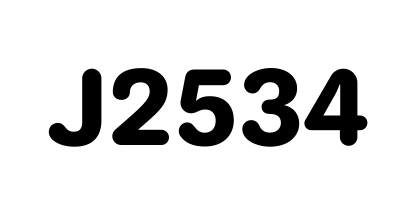 J2534 PassThru
TOKENS 5 DIAGNODES tokens
Spent from your balance on every run.
5 DIAGNODES tokens
Spent from your balance on every run.




You Have Questions?
In case you can't find what you need please Contact us
Which software do I need?
The DiagNodes Companion App runs on Windows, macOS and Android.
How much does it cost?
5 tokens per use. Token prices are on the pricing page.
Can I undo a service reset?
Yes. Service Reset can also undo the last service confirmation. The undo is a separate run and uses 5 tokens.
Can I check the service data before the reset?
Yes. The Service data section reads the current service values and the workshop code from the vehicle.